Installation
DeviceView ships one agent per supported platform. Every agent connects back to the same tenant, so your technicians see one unified device list regardless of platform.
Android
Available enrollment methods: QR code, APK Install, Managed app configuration.
QR Code
- From the Device Enrollment screen after creating a enrollment token click on the ... to the far right of the screen.
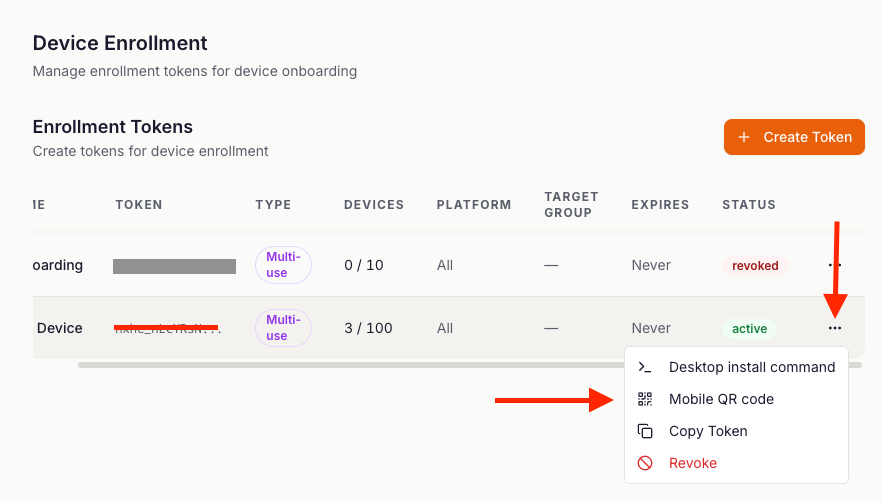
- Scan the Enrollment QR code with a camera application on the target device.
- The agent will install automatically and onboard the device onto DeviceView.
APK Install
- From the Device Enrollment screen after creating a enrollment token click on the ... to the far right of the screen.
- Download the two supplied APK's. DeviceView Agent APK & Addon APK
- Turn on Developer mode via System Settings, enable ADB and sideload the supplied APK's via command line using the command
adb install "apk_file"
Managed configuration:
- Copy the Managed Config information in the Android Enrollment QR code
For BYOD fleets, the agent runs in the work profile and respects all Android Enterprise policies. For fully-managed fleets, enroll during device setup using a QR code from the console.
Windows
- From the Device Enrollment screen after creating a enrollment token click on the ... to the far right of the screen.
- Click "Desktop Install Command" and you will be presented with a powershell command and standalone installers.
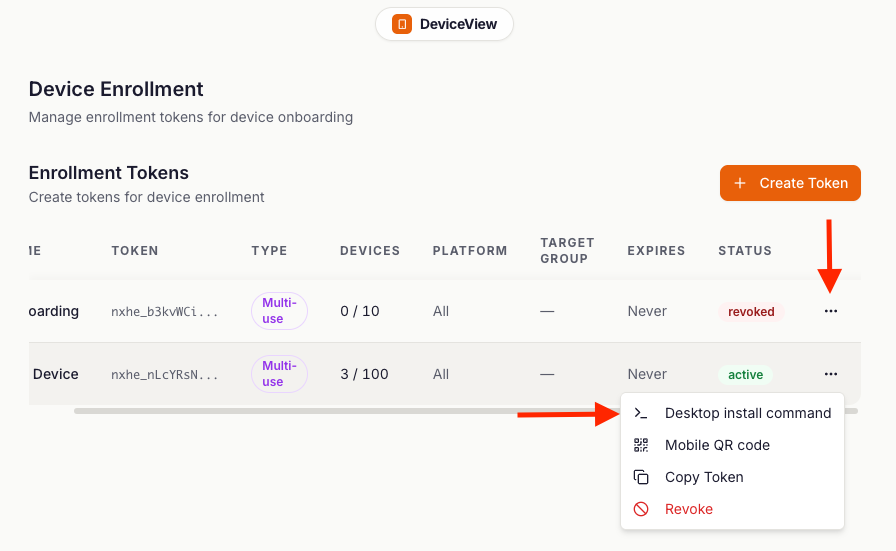
PowerShell
- You can install the agent via a powershell command after creating an enrollment token. Copy the supplied powershell command which has the enrollment token already injected into a powershell window on the target Windows computer and run. Ensure you accept the UAC prompt if it pops up.
Standalone Installer
- Download the correct version for your system, either x64 or arm64.

- On the target machine run the .exe file and accept the UAC prompt
iOS
iOS support coming soon
macOS
Mac OS support coming soon
Linux
Linux support coming soon
Unattended access
Every platform supports unattended access.
Next
- Live Remote Support guide — your first live session, step by step.
- Fleet Management — groups, tags, and bulk enrollment.