Fleet Management
Managing a handful of devices is fine from the device list alone. Managing hundreds or thousands needs structure — groups!
Groups
Groups are the primary unit of management. A device belongs to exactly one group.
Common groupings:
- By site —
store-NYC-12,warehouse-ATL-3. - By role —
kiosk,handheld,technician-laptop. - By environment —
production,staging,dev.
Bulk enrollment
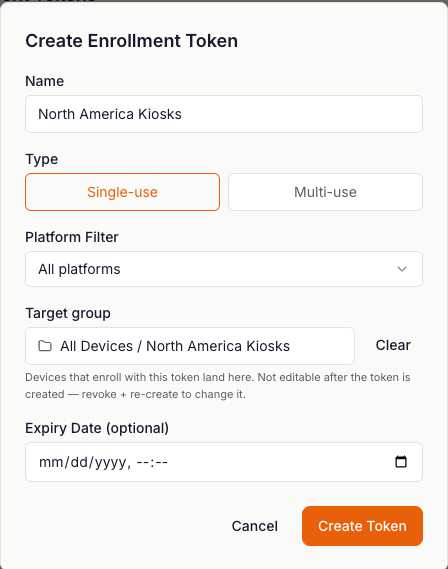
For fleet rollouts, use bulk enrollment via Token creation and adding the desired group to the token. The device will onboard to the selected group
Moving devices between groups
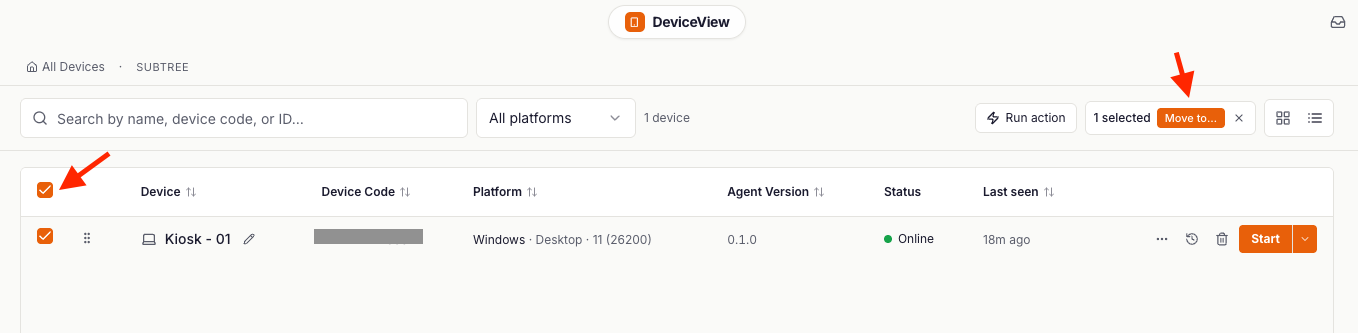
Bulk-move devices in the device view. Moving a device changes group location immediately.
- Navigate to the Devices page
- Select the devices you want to move into a new group using the selection box on the left side of the device name
- Top right click the orange "Move To" button
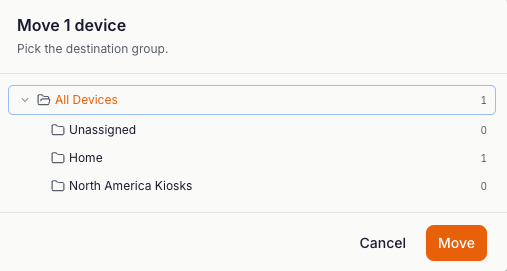
- In the pop up desigate which group you want the target devices to move to and click "Move"
Related
- Installation — how devices end up in DeviceView in the first place.